 n8n Automation Hub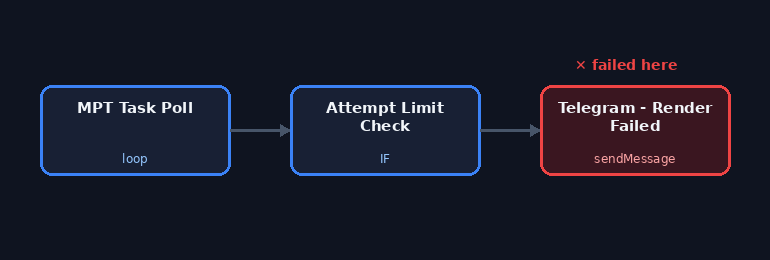
The same Telegram error, a different mistake
This n8n instance already has one article about a Telegram sendMessage node failing with can't parse entities — that one came from a Markdown parse mode choking on a stray character an LLM had generated in a caption. This is the same error class, on an unrelated workflow, from a genuinely different mistake: a message template that still had an HTML <b> tag in it, paired with a node that had never had its parse mode explicitly set.
The node is Telegram - Render Failed inside WF - Geld Verstehen Creator, a watchdog step that fires when a MoneyPrinterTurbo video render doesn't finish after a set number of retries. It's not customer-facing — it's an internal alert to a personal Telegram chat — which is exactly the kind of low-visibility node where a broken alert can sit unnoticed for a while, because the only symptom is that the alert itself never arrives.
What the error actually pointed at
Telegram's Bot API returned 400: can't parse entities: Can't find end of the entity starting at byte offset 83. That error means Telegram tried to interpret the message text as formatted content — HTML or Markdown entities like <b>, *bold*, _italic_ — and found a tag or marker it couldn't close. Byte offset 83 landed inside a <b> that opened a bolded warning line but had no matching close before the message ended awkwardly for Telegram's parser.
The n8n Telegram node's additionalFields.parseMode controls how the outgoing text is interpreted: HTML, Markdown, or none. When it's left unset, the node still sends a default parse mode to the Telegram API rather than sending raw text — so any angle brackets or Markdown-looking characters in the message get interpreted whether or not that was the intent. This node's text was written with an HTML tag for emphasis but without ever setting parseMode to HTML to match — a mismatch between what the text assumed and what the node was configured to do.
Fixed by removing the ambiguity, not by picking the "right" parse mode
The live node configuration, read fresh via the n8n API, shows the fix that's already in place: the <b> tag is gone from the message text entirely, and additionalFields.parseMode is now explicitly set to "none". Rather than fixing the mismatch by setting parseMode to HTML and keeping the tag, the simpler direction was taken — an internal alert message doesn't need bold text badly enough to carry the risk of a future edit reintroducing an unescaped character that breaks parsing again.
That's a meaningfully different fix than the other Telegram article on this site, where the resolution was to set parseMode: "none" on a message whose formatting was accidental (an LLM's stray character), not the point of the message. Here, the formatting was intentional at some point but got orphaned when the text was edited, and the safer call was to drop it.
The sibling node that hasn't broken yet
The same workflow has a second Telegram node, Telegram - Queue Exhausted, that fires when a content topic queue runs dry. Its text still contains an HTML <b> tag, and its parseMode is also unset — the identical latent setup that broke the render-failed alert. It hasn't errored, most likely because its fixed message text happens not to contain any character that trips up whatever default parsing n8n applies when parseMode is left blank. That's not a guarantee it stays safe; it's simply a message that hasn't yet hit the specific shape that causes a parse failure. Left as-is for now, since fixing a node that isn't actually failing wasn't part of this check — worth revisiting if it ever throws the same error.
What confirmed it
There's no way to force this exact historical error on demand without deliberately breaking the node again, so the confirmation here is a direct read of the live node configuration via the n8n API: no <b> tag in the text, parseMode: "none" present in additionalFields. The workflow is confirmed still active: true.
Two safe setups for alert messages
For internal alerts there are only two configurations I use now, and the rule is that the text and the parse mode are always changed together:
| Setup | Message text | Parse Mode |
|---|---|---|
| Plain | No tags, no Markdown markers | None, set explicitly |
| Formatted | HTML tags only, with every variable part escaped | HTML, set explicitly |
Leaving the parse mode unset is the one combination to avoid, because then the text is interpreted by a default you didn't choose.
Variables in alert text are the real risk
Alerts usually include something from the failed run: an error message, a file path, a topic title. Error messages are full of characters that break formatted modes, such as < and > in stack traces or underscores in file names. With HTML mode, escape every inserted value:
{{ String($json.error ?? '').replace(/&/g,'&').replace(/</g,'<').replace(/>/g,'>') }}With plain text, none of that is needed, which is why most of my alert nodes are plain now.
When the alert itself fails
A failed alert hides the failure it was supposed to report, and in a branch that also resets state, it can block the reset. Three habits that came out of this:
- Run state-changing steps, such as releasing a topic, before the alert, not after it.
- Set the alert node to continue on error, so a formatting problem in the message can't stop the branch.
- Have a second path for errors: the workflow's error workflow sends a message for any failed execution, so a failed alert node is itself reported.
And when one node with a pattern breaks, search the instance for the same pattern. Here the sibling node had the identical setup and was simply waiting for the right message to fail.
Frequently asked questions
Why does a leftover <b> tag break a Telegram message in n8n?
With the parse mode unset, the text was still interpreted as formatted text. The orphaned tag couldn't be closed, so Telegram rejected the whole message.
Should alert messages use HTML formatting?
Only if you set Parse Mode to HTML explicitly and escape every variable value. Plain text with Parse Mode None is the safer default for alerts.
How do I stop a failing alert from blocking other steps?
Run state-changing steps before the alert and set the alert node to continue on error, so a message problem can't stop the branch.
How do I find other nodes with the same problem?
Search all workflows for Telegram nodes whose text contains tags or Markdown markers and whose parse mode is not set.