 n8n Automation Hub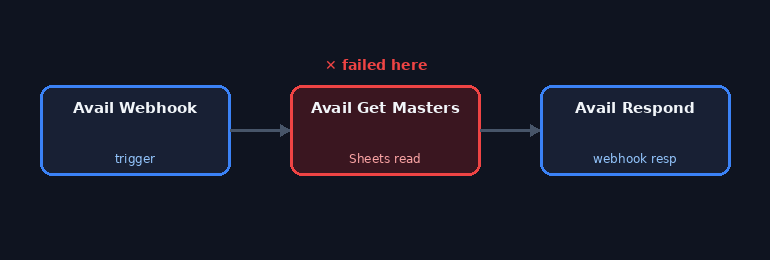
Every other bug on this site had an API fix. This one doesn't.
Most of the real bugs documented on this site — 503s, rate limits, malformed messages, misconfigured nodes — get fixed the same way: read the live workflow via the n8n API, change the one thing that's wrong, write it back, confirm with a fresh read. That pattern breaks down completely for one specific error class, and it's worth being honest about why, because it's a real limitation anyone running n8n against Google or other OAuth-based services will eventually hit.
The Avail Get Masters node in the calendar-booking demo — a Google Sheets read that checks which staff or resources are available before offering booking slots on a public-facing webhook — started failing on essentially every call with: "The credential 'Google Sheets account' needs to be reconnected." Since this node sits near the top of the booking flow, every webhook hit downstream of it fails the same way, which for a live demo means the booking page simply stops working.
What this error actually means
n8n's own description is specific: "Access could not be refreshed because the connected account has revoked access, the refresh token expired, or the account password or permissions changed." An OAuth2 credential like this one doesn't store a permanent password — it stores a refresh token that n8n uses to mint short-lived access tokens on demand. When Google invalidates that refresh token — because access was manually revoked in the Google account's security settings, because the token aged out, or because something about the account's security state changed — every future refresh attempt fails, and there is no data left in n8n that can regenerate a valid one. A new refresh token can only come from the user completing Google's OAuth consent flow again, in a real browser, for that specific Google account.
This isn't unique to this one workflow. The same day, a completely unrelated workflow on this instance — WF - German News Channel — hit the identical error class on its YouTube upload credential: The credential "YouTube - German News Channel" needs to be reconnected, same underlying description. Two different credentials, two different Google API products, same root cause category. That's a useful signal on its own: when this error shows up, it's worth checking whether other OAuth credentials on the same Google account are affected too, rather than assuming it's isolated to the one workflow that happened to be the first to notice.
Why the API can't fix it
The n8n public API can read a credential's metadata and can update most of what a workflow node does, but it has no endpoint that performs an OAuth authorization-code exchange on a user's behalf — that flow requires a browser redirect to Google's consent screen, the user clicking "Allow," and Google redirecting back with a fresh authorization code. There's no way to script around that step; it's a deliberate part of how OAuth is designed to work; a service that could silently regenerate its own access to a Google account without a human in the loop would defeat the purpose of the consent screen entirely.
Where this stands
Unlike the rest of this site's articles, this one isn't reporting something already fixed. As of this check, the calendar-demo booking flow is still failing at the availability-check step, and the German News YouTube upload credential is in the same state. Both need a manual reconnect through n8n's credential UI, logged in as whichever Google account each credential belongs to. Nothing about this required rewriting a node, adding a retry, or changing any configuration — retries don't help here, since a revoked refresh token fails identically on every attempt. This is simply the one class of n8n failure that ends at "someone needs to log into Google," documented honestly rather than skipped because it doesn't have a tidy before/after fix to show.
The most common cause on small setups: Testing mode
When the same Google credentials need reconnecting again and again, check the OAuth consent screen of the Google Cloud project behind them. Google's documentation states that an app with external user type in "Testing" publishing status issues refresh tokens that expire after 7 days. Any n8n credential built on that client stops working a week after its last connection, regardless of what the workflow does. That fits the pattern here: two different Google products, the same day.
The options:
- Publish the app. For sensitive or restricted scopes, such as YouTube upload or Gmail, Google requires verification, which takes time and paperwork.
- Use an internal app in a Google Workspace organization, if the accounts belong to that organization.
- Keep Testing mode and reconnect on a schedule. A weekly reminder is a small price for a few personal workflows, and it is what this instance does.
A reconnect routine that takes five minutes
- List the failing credentials: the n8n API's executions endpoint with
status=errorshows which nodes failed, and the error text names the credential. - Open each credential in the n8n editor and click the reconnect or sign-in button.
- Sign in with the Google account the credential belongs to. With several Google accounts in one browser, this is where most mistakes happen.
- Run each affected workflow's read-only step, or wait for the next scheduled run, and check it succeeded.
Knowing before the users do
For a public-facing workflow like a booking page, a broken credential means a broken product. Two safeguards help:
- An error workflow (set in the workflow's settings) that sends a Telegram message for every failed execution, so the first failure is noticed, not the hundredth.
- A scheduled health check that uses each Google credential for a cheap read once a day and alerts on failure, independently of real traffic.
Frequently asked questions
Why does n8n say the credential needs to be reconnected?
Google no longer accepts the stored refresh token, because access was revoked, the token expired, or the account's security settings changed. Only a new sign-in can replace it.
Why do my Google credentials expire every week?
If the Google Cloud app's OAuth consent screen is in Testing status with external users, Google expires refresh tokens after 7 days.
Can I reconnect an OAuth credential through the n8n API?
No. The OAuth consent step needs a person in a browser, so reconnecting is always a manual step in the n8n editor.
Do retries help with this error?
No. A revoked or expired refresh token fails the same way on every attempt.