 n8n Automation Hub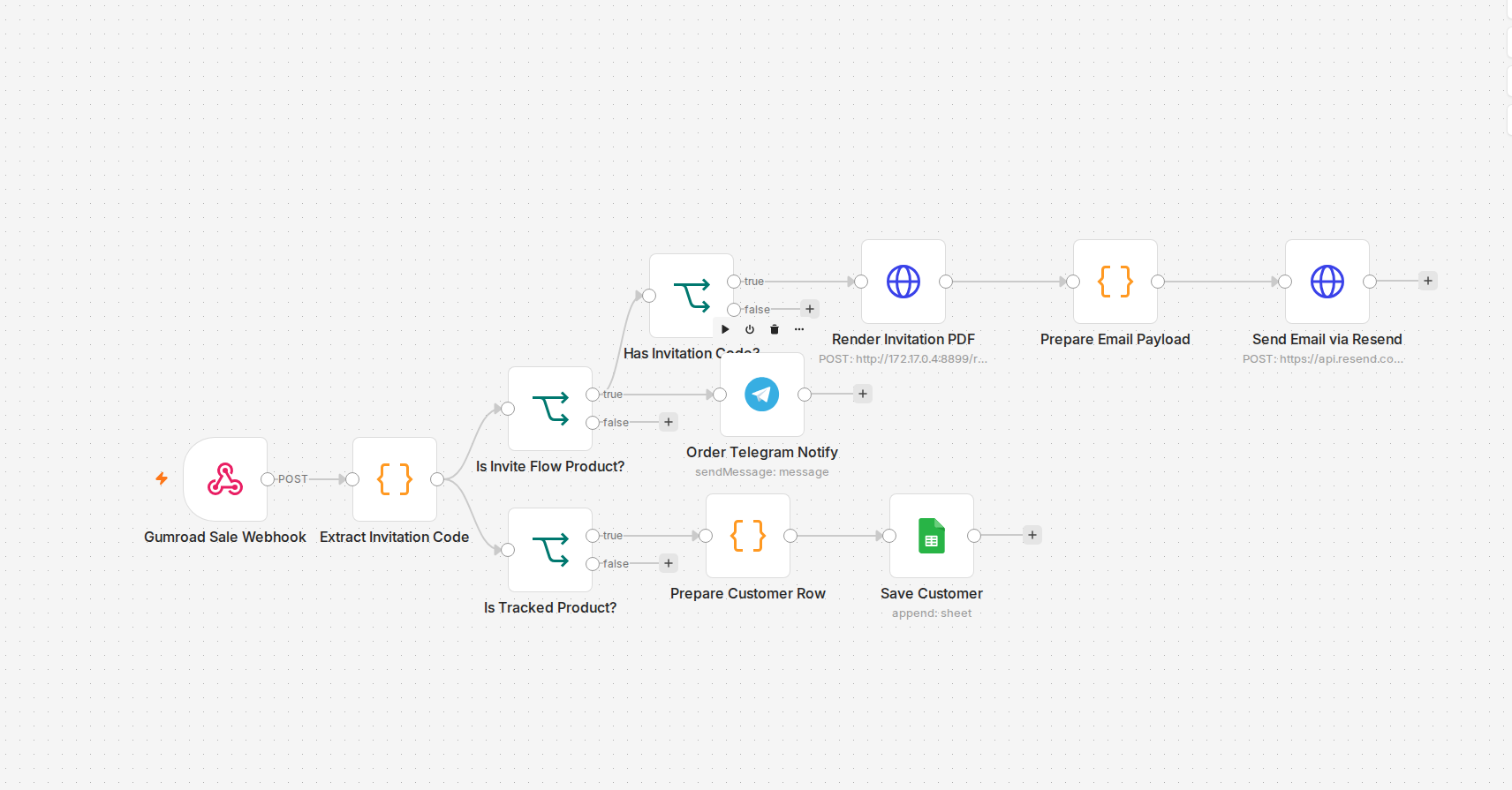
Why the webhook is the easy part
Gumroad's sale webhook is reliable and fires fast — that was never the problem. The actual engineering is what happens between "webhook received" and "file delivered." For a static product, that gap is nothing. For anything personalized, it's the whole workflow: read the order's custom fields, run whatever generation step produces the actual file, confirm it built correctly, then attach and send it. I'd rather have that confirmation step than assume generation always succeeds — a silently-failed build with a "you're all set!" email is worse than a slightly slower delivery.
The API gotcha nobody warns you about until you hit it
Building a new product's files is straightforward — upload, get file ids, attach them. Updating the files on a product that's already live and already has sales is a different problem entirely. Gumroad's product-update endpoint treats `files[]` as a full-replacement array, and if any of your existing files are still referenced by a variant's rich content, the API just refuses the update outright rather than telling you how to fix it cleanly. The actual fix is a specific three-step sequence: strip the rich-content file references from every variant first, then replace the file list, then re-attach the new files to each variant's rich content. Skip step one and the whole update bounces with an error that doesn't obviously point at the fix.
The other one: a live product can go missing from your own API
I also hit a case where a product that was very much live and sellable simply didn't show up when I listed products through the API — not a permissions issue, just absent from the response. The product still existed, still took payments, still had a working public page; it just wasn't enumerable the normal way. The workaround was pulling it by its public permalink URL directly instead of relying on the list endpoint to surface everything. Worth knowing before you assume "not in the list" means "doesn't exist."
What actually mattered for reliability
Two things made this dependable in production: never trusting the webhook payload's fields blindly (validate before generating anything — a bad or missing field should fail loudly, not produce a broken file), and keeping my own order log outside of Gumroad's dashboard, so I have a record I can search and re-drive from if a delivery ever needs to be resent manually.
How the live order workflow is wired
I re-read the workflow that delivers one of these personalized products (11 nodes, active, with a workflow-level error workflow set) to replace the general description above with what it actually does.
- One webhook, then a product check. A POST webhook receives the sale. The first Code node reads the product from
permalink, falling back toproduct_permalinkand thenshort_product_id, and marks the order as this product only when it matches exactly. That check is what keeps a webhook that fires for every product on the account from delivering the wrong file, the problem described in the account-wide webhook article. - The buyer's design travels inside the order. The personalization is a base64-encoded JSON object with
styleandfields. The Code node does not rely on one custom-field key: it walks the whole payload, down to four levels of nesting, and takes the first string of 20 characters or more that decodes to JSON with those two properties. - Render, then email. An IF sends orders with a code to an HTTP request against an internal render service (timeout 30 seconds), and the resulting PDF is attached to an email sent through the Resend API. A separate Telegram message tells me about the order.
- Two branches, two jobs. One branch delivers. The other, for a tracked product, builds a row (email, name, order date, style, product, category) and appends it to my own Google Sheet, so the order log lives outside Gumroad.
What the export does not do
The render step returns a success flag and the payload carries it forward, but no node branches on it in this build. The false output of the has-a-code check is also empty: a buyer who did not paste a code gets no email, and only the Telegram message says so. I have not tested a failed render, so I cannot say exactly how it surfaces; the safe version puts an IF on success before the email step and tells you when it is false.
How to check a delivery end to end
Send a test purchase through the real webhook, then confirm four things in order: the execution reached the email node, the attachment opens and shows the buyer's choices, the row appeared in your own sheet, and the alert reached you. A green execution alone proves none of those.