 n8n Automation Hub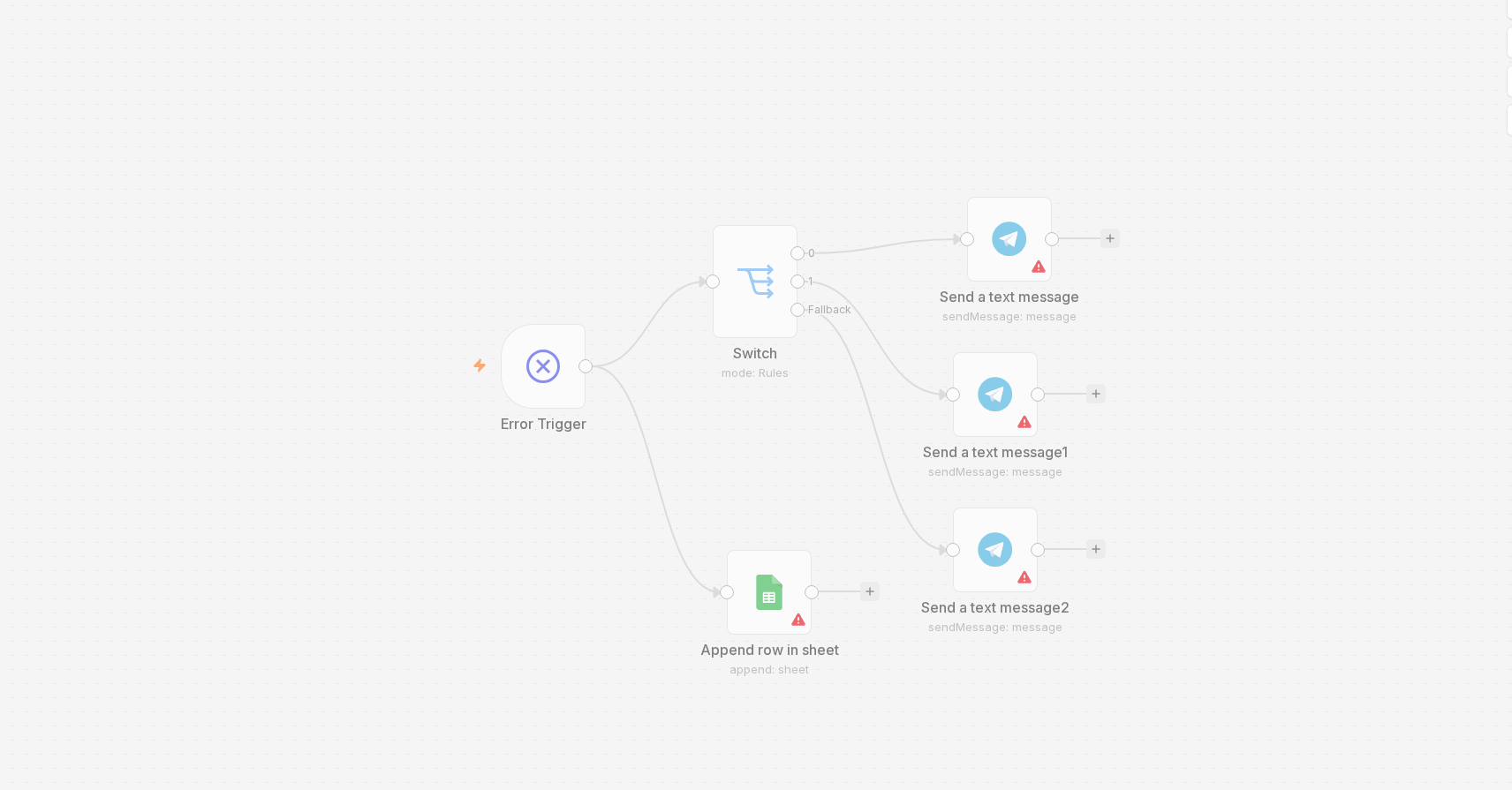
Why three channels instead of one
A Telegram ping is the thing I actually see in real time, so it's the first alert. But Telegram messages scroll past. If something fails at 2am and I don't catch it until the morning, I still want a record — that's what the Sheet is for. And a handful of failures are bad enough that a chat notification isn't enough backup, so those also trigger an email through Gmail's OAuth2 node. Three channels sounds like overkill until the one time you need the one you didn't build.
What actually gets logged
Every row in the Sheet has seven columns: Timestamp, Workflow Name,
Node Name, Error Type, Error Message, Execution ID,
and Execution URL. That last one matters more than it sounds — a direct link straight to the
failed execution in n8n means I'm not reconstructing what happened from a one-line error message, I'm
looking at the actual run.
The gotcha that cost me twenty minutes
The first time I wired this up, the Google Sheets "Append" node kept failing with a message that had nothing obviously to do with permissions or auth: "Column names were updated." Took me a while to realize n8n's Sheets node validates your outgoing field names against the sheet's actual header row — and my header row was blank. The node isn't guessing at columns, it's matching them. Add the header row first, exactly matching the field names you're sending, and the append works immediately. Obvious in hindsight, not obvious from the error text.
From internal tool to an actual product
This started as something I built for myself, purely to stop finding out about failures too late. It turned out to be generic enough — any n8n setup with more than a couple of workflows runs into the same "how do I actually find out when something breaks" problem — that I packaged it and listed it on the Nexus marketplace as a ready-to-install product. Same three channels, same Sheets log, wired to your own bot token and Sheet instead of mine.
What the exported workflow does, node by node
This is the export behind the seven-column log described above, read from the workflow JSON.
- Error Trigger starts it whenever another workflow that names it as its error workflow fails.
- Switch has four named outputs plus a fallback:
AUTH_ERROR(regex401|403|unauthorized|auth|forbidden),TIMEOUT(timeout|ECONNRESET|ETIMEDOUT),RATE_LIMIT(rate limit|429|too many requests) andNETWORK(ENOTFOUND|network|connection refused), all tested againstexecution.error.message. - Set writes an
errorTypelabel, then Google Sheets appends the row:new Date().toISOString(),workflow.name,execution.lastNodeExecuted,execution.id,execution.url,execution.error.messageand the label. - Telegram sends the alert, then an IF called Is Critical decides whether a Gmail email follows.
Two bugs I found by re-testing it
Re-reading the export, two things looked wrong, so I copied the exact conditions into a throwaway workflow and pushed five sample messages through them (a 401, an ETIMEDOUT, a 429, an ENOTFOUND and one unrelated message).
- The critical email cannot fire on real errors. Is Critical uses the
containsoperator with the right-hand valuetimeout, ECONNRESET, ETIMEDOUTtyped as one comma-separated string.containslooks for that whole string inside the message. In the test,The connection ETIMEDOUT while calling API,timeout, a 429 message and a 401 message all went to the false output; only a message that was literallytimeout, ECONNRESET, ETIMEDOUTwent to true. The fix is the regex operator with|, the way the Switch node does it. In the same test the Switch sent each of the five messages to a different output, so the regex form works. - Every row was labelled as info. The Set node picks the label with
$json.errorOutput === 0,=== 1and so on, but items leaving a Switch node carry noerrorOutputfield. In the test all five items came out with the same fallback label even though each left a different Switch output. Use one Set node per Switch output with a fixed label, or a single Code node that returns the label from the message.
Order matters when a step fails
The chain is Sheets, then Telegram, then the email check. None of those nodes has an error output enabled, so by default an error in the Sheets append stops the run before Telegram fires. That is exactly what the blank-header failure above does. If the Telegram alert is the one you rely on in real time, put it first, or set the Sheets node to continue on error.
Test it before you need it
Do not wait for a real failure. Point a throwaway workflow at the error workflow in its settings and make it fail on purpose, for example with a Stop and Error node carrying a message such as 429 too many requests. Then check three things: the Sheet row exists with the right label, the Telegram message arrives, and the email arrives for the messages you consider critical.