 n8n Automation Hub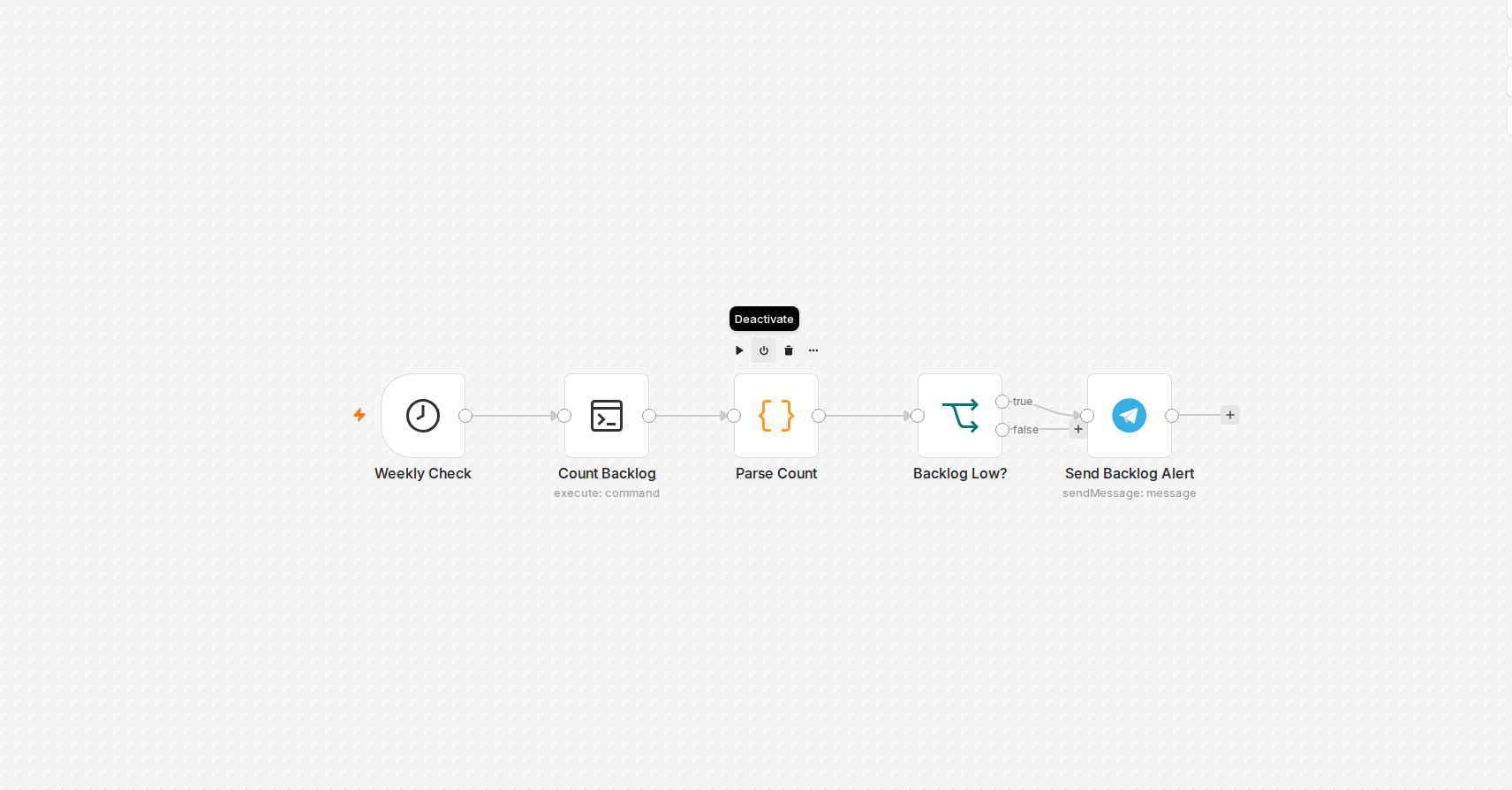
The actual check is one shell command
The workflow doesn't need an API, a database query, or a custom script — it needs to know how many files are sitting in one directory on the server. A Schedule Trigger fires weekly, and the very next node is an SSH connection running a single `find` command with `-maxdepth 1` and a name filter, piped to `wc -l`. That's the entire "integration" — no new service, no webhook, just a command that already works fine from a terminal, run on a timer instead of by hand.
Turning command output into a number worth checking
SSH command output comes back as text, and text isn't something an IF node can compare against a threshold directly. A small parsing step pulls the digits out of the raw output and hands forward a clean integer. It's a trivial transformation, but skipping it is exactly the kind of thing that turns into a silent bug later — comparing a string that happens to look like a number works right up until whitespace or a stray newline in the command output makes the comparison quietly false when it should have been true.
Why the threshold check has to gate the message, not just log it
The IF node splits into two paths after the count: at or below the threshold continues to the Telegram node, anything above it dead-ends. The workflow runs every single week regardless — the choice to stay silent most of the time is deliberate, not a missing feature. A weekly "everything's still fine" message is exactly the kind of notification that gets muted within a month and then misses the one week it actually mattered. The whole point of this workflow only works if silence is the default state and a message is rare enough to actually get read when it shows up.
The dead end: why a cloud AI scheduler couldn't do this
Before wiring this up in n8n, I tried the obvious shortcut — an AI agent's own built-in scheduling feature, the kind that runs a prompt on a timer without needing a workflow tool at all. It didn't work, and not because of a configuration mistake: that kind of scheduled agent run executes in an isolated cloud sandbox with no route back to this specific server's filesystem or its local n8n instance. It can check a git repo it can clone, or call a public API — it structurally cannot SSH into a private box and count files in a folder that only exists there. Any "watch something on my own server and tell me" task needs the check to run from something that already has a foot on that server, which for this account means an n8n workflow with its own SSH credential, not a general-purpose cloud scheduler.
What actually changes if the threshold needs tuning
The whole workflow is five nodes and two numbers: the IF node's comparison value, and the Schedule Trigger's day/hour. Both are edited in place, no redeploy, no code change — which is really the argument for building this as an n8n workflow instead of a cron-triggered script in the first place. The logic is small enough that a workflow canvas is genuinely easier to read at a glance than the equivalent script would be.