 n8n Automation Hub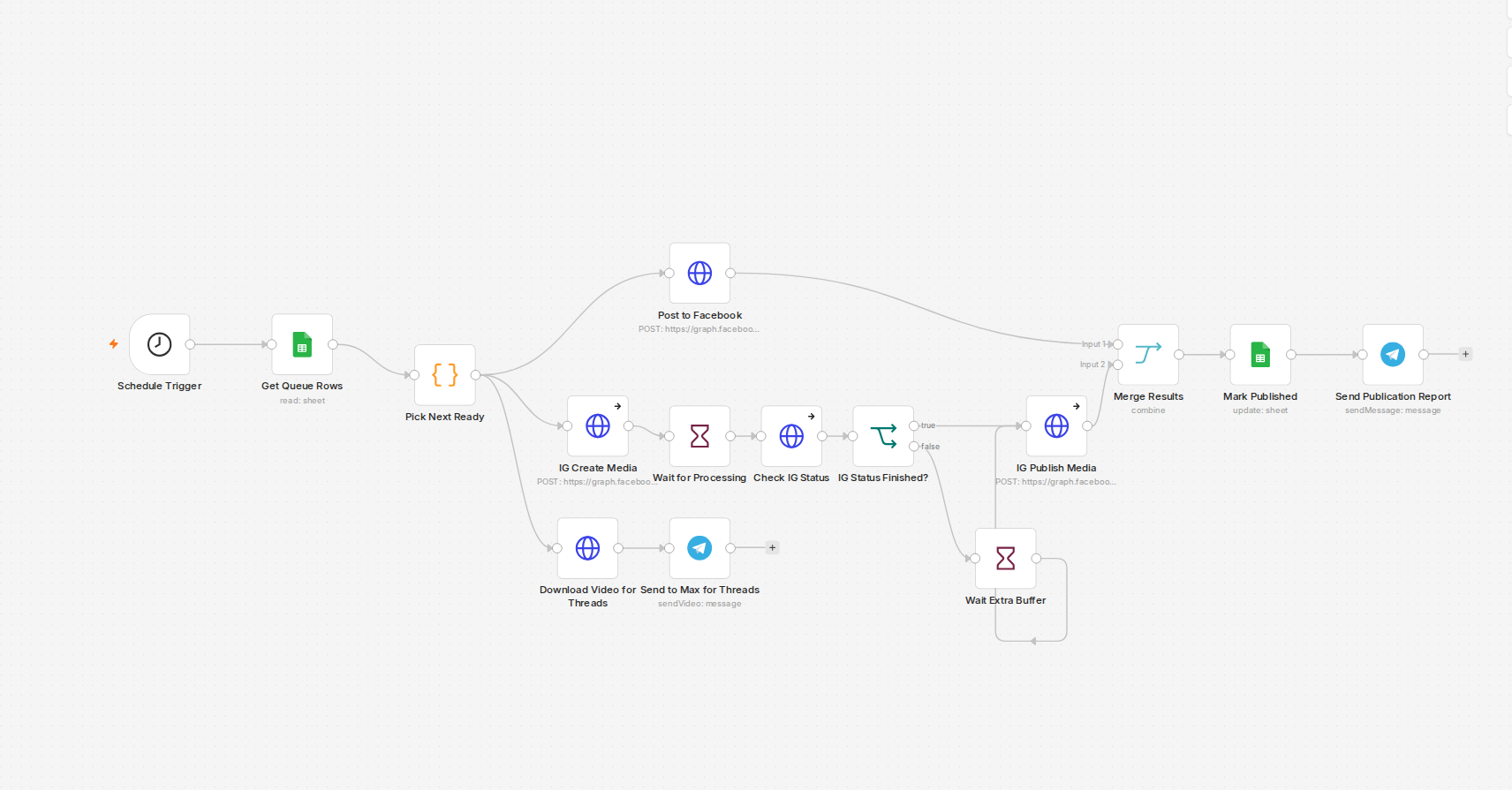
The queue is just a Sheet, on purpose
The VideoQueue tab has seven columns: video_key, title,
video_url, fb_caption, ig_caption, status,
published_at. No dashboard, no separate app — anyone who can edit a spreadsheet can queue up a
week of content. The Code node's whole job is to grab the rows with status == 'ready' and take
the first one, so the order in the sheet is the order it posts.
Matching by video_key, not row number
Early on I matched updates by row position, and it went wrong the first time someone (me) reordered
rows while a run was in flight. Now every match — reading which row is next, writing back that it published
— goes through video_key, a stable string I set once per video. Row position drifts. Keys
don't.
The part that actually needs the Graph API
Facebook Page posting is a straightforward POST /{'{page-id}'}/videos with a
file_url and a description. Instagram is a two-step dance: first
POST /{'{ig-id}'}/media with media_type: REELS, the video URL, and a caption,
which hands back a creation_id — then a second call, POST /{'{ig-id}'}/media_publish,
to actually publish it. In between, I wait 45 seconds flat rather than polling the container's processing
status. That's an honest shortcut: it works fine for short 15-20 second clips, but a longer video would need
real status polling instead of a fixed wait — I just haven't needed it yet for what I'm posting.
The gotcha nobody mentions: video hosting
Both Graph API endpoints fetch the video by URL server-side — there's no simple direct-binary-upload path through this flow. So the video needs to already be sitting somewhere with a real public HTTPS URL before either request goes out. I didn't stand up a separate video host for this: the finished MP4s just get copied into the same nginx docroot that already serves the rest of the site, so they're immediately reachable at a normal URL. One less moving part.
Closing the loop
Once both platforms confirm, a Merge node combines the results, the Sheet row flips to
published with a timestamp, and a Telegram message tells me it happened — or, more usefully,
tells me when one side succeeded and the other didn't.
Update: what the workflow looks like now
The version described above was the first one. I re-read the current export of the same publisher (it now has 24 nodes and posts to four platforms) and three things changed or are worth knowing.
- The fixed 45-second wait became a status check. After
IG Create Mediathere is a 60-second Wait, then a GET on the container with?fields=status_code, then an IF that tests whetherstatus_codeequalsFINISHED. It is one check, not a loop: FINISHED goes straight tomedia_publish, and anything else waits another 30 seconds and publishes anyway. That is better than a blind wait, but it still would not survive a container that needs several minutes. A real loop would send the false output back to the check with an attempt limit. - Matching by
video_keyis exactly how the write-back works. The update node setsstatustopublishedand a date, and its matching column isvideo_key, taken from the row picked at the start, not from a row number. - Threads and LinkedIn were added to the same run. A Merge node with four inputs waits for Facebook, Instagram, Threads and LinkedIn before the row is marked. The Instagram, Threads-publish and LinkedIn calls continue on error, so a failing branch still delivers an item to the Merge. The Facebook call instead retries three times, three seconds apart, and has no error output. I have not tested what a hard Facebook failure does to the sheet row, so check that before relying on it.
Two details that matter for the Graph API calls
The Instagram container is created with media_type: REELS, a video_url and a caption, and the publish call sends only the creation_id returned by the first call. On the Threads side the caption expression cuts the text to 500 characters, which is the limit covered in the Threads 500-character article.
How to check that a run really worked
Do not trust a green execution. Open the run and look at the output of the two publish calls: each should contain an id. Then confirm the sheet row shows published with a date, and open the post on each platform once.